Field guide
Fix Word Hunt screenshot recognition
Crop, check the grid, inspect uncertain letters, and recover from unsupported files.
Begin with a clean board crop
Select, drag, or actively paste a PNG, JPEG, or WebP image in the screenshot tool. Recognition runs locally. A geometry candidate locates repeated tiles rather than reading the entire conversation as text. The board is found and read automatically. Compare the original board with the recognized letters; use Adjust crop / retry if the area includes the keyboard, score, or chat bubbles, or misses any board edge.
Confirm the number of rows
Match 4×4, 5×5, 6×6, or 7×7 to the image itself. A wrong size shifts every cell boundary. Use the crop controls to include an equal margin around the tiles. Rotation correction can help a slightly rotated board. Perspective correction is not implemented; recover a skewed board by cropping and entering its letters manually. Glare, obscured letters, and unusual themes remain unvalidated.
Inspect the letters, not a confidence percentage
Edit any wrong letter directly in its grid tile. For a closer look, focus that tile and open Correction tools to inspect its source crop and candidate letters. Template matching scores describe resemblance to the installed templates; they are not calibrated accuracy probabilities. Fill unknown letters in the grid, then choose Confirm & solve. We do not change letters to produce a larger word count, because a wrong board can still produce many valid words.
Recover from a failure
If automatic detection fails, keep the image and adjust the crop manually. If recognition remains uncertain, enter the letters directly. If decoding fails, export a real PNG or JPEG; renaming a HEIC extension does not convert the image. Files over the stated file or pixel limits should be cropped or reduced in an image editor before retrying. These three published cases do not establish representative real-game screenshot accuracy; see the OCR methods and sample status.
Practical details and worked examples
A usable image-based solver needs a readable board, a correct crop, and an explicit review of the letters. Automatic suggestions can reduce typing, but they can also miss a border or confuse a glyph. Inspect each stage and preserve the crop. Manual correction is a normal recovery step and is reported separately from automatic transcription.
Inspect the file before diagnosing recognition
Choose a supported Word Hunt solver picture in PNG, JPEG, or WebP. Renaming a HEIC file does not convert its encoding; export it to a supported format first. A file that cannot decode never reaches recognition, so a different font template cannot fix that failure. The current image limit is 15 MiB and 20 million decoded pixels, with a maximum dimension of 16,000 pixels. Reduce an oversized image or crop it locally, then select the resulting file.
Correct the crop before comparing letters
The locator proposes geometric candidates rather than using one fixed phone coordinate. For a Word Hunt solver picture, confirm that the crop contains the full square board and excludes nearby chat bubbles, score panels, and unnecessary margins. Choose the actual row count before recognizing cells. Numeric crop controls provide a keyboard alternative to dragging. When a Word Hunt solver screenshot is split into the wrong number of rows, every later letter comparison becomes unreliable.
Inspect uncertain cells at their original scale
To check a Word Hunt solver picture, open the enlarged original tile and compare it with the candidate letters. The matching score is similarity, not a calibrated probability that a character is correct. An apparently strong match still needs review. If none of the candidates matches the visible tile, type the correct letter rather than picking the highest score. Empty or unresolved cells remain marked unknown and cannot proceed as invisible guesses.
Treat rotation and unfamiliar styling separately
A slightly rotated crop can be adjusted within the available correction controls. The implemented rotation range is limited; perspective distortion from an angled camera photo is not validated. Generic browser-font templates may not match a particular game theme or device. The optional local OCR fallback works on cropped cells and can suggest another letter, but it does not remove the review requirement. Changing crop boundaries may help more than repeating recognition unchanged. If a crop's vertical edges converge, request an upright screenshot rather than interpreting rotation as full perspective repair.
Recover without rebuilding the whole task
Keep the loaded image while adjusting crop, size, or cell inset, then recognize again. Cancel an outdated attempt when replacing a picture. If the style remains unreadable, enter the board manually and verify its rows against the source. A Word Hunt solver picture does not become trustworthy because its letters produce many English words; the recognizer never uses answer counts to decide what a tile should say.
A practical sequence
- Confirm the file format and check that it opens locally.
- Adjust the crop, rotation, and board size.
- Compare every tile with the enlarged original and replace wrong suggestions.
- Use manual input if recognition remains uncertain, then solve the confirmed board.
A worked example
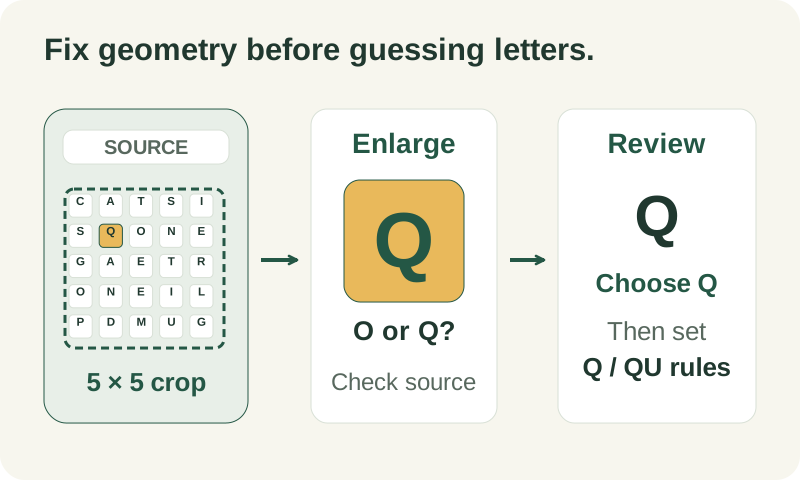
Suppose a 5×5 board is inside a large chat screenshot and the proposed crop includes the timer above it. First move the top crop edge below that panel and confirm five rows. Recognize again, then inspect a tile that resembles O or Q at larger scale. Choose Q only if the original glyph supports it. The repaired Word Hunt solver screenshot can lead to a correct solve after review, but that success must not be counted as an unassisted automatic recognition result.
What to carry into your next attempt
A Word Hunt solver picture is ready when the crop, size, and every letter agree with the source image. Resolve those checks before considering the answers. Keep manual entry available for unfamiliar styles, preserve the recoverable crop, and distinguish a successful correction workflow from any future measured automatic accuracy.
Check the selected rules and custom points, word-list source and license, verification methods, and local data and network details when interpreting this example.
Updated October 10, 2026 · Independent Word Hunt Solver project