Project information
Word Hunt help and recovery
A practical checklist for input, recognition, results, practice, and local records.
Enter a board
Select its size and enter one tile per cell, or paste rows in reading order. Spaces and line breaks separate tiles. Use QU as one token when appropriate. Fix missing or extra cells before solving; blank cells are not wildcards. Arrow keys move through the grid, and undo restores recent edits.
When a screenshot fails
Check the format and size limits shown in the screenshot panel. Use an actual PNG, JPEG, or WebP; HEIC is not verified. Keep all tiles inside the crop, confirm the size, and inspect uncertain cells. You can return to the crop, retry recognition, or type the board without selecting another file. See the detailed troubleshooting guide.
Understand results and interruption
Choose a word to see its numbered path. Change sorting or filters without changing the underlying rule. A budget-stopped search is partial; run again or simplify the rule to continue investigating. Cancel stops the search. Editing the board invalidates old answers and requires a new solve.
Practice and history
Start daily, random, custom, or themed practice. Ordinary sessions can be paused; their records retain the pause flag. End a round to compare found words and missed words under the same dictionary and rules. History is stored on this device and browser. Import a previously exported JSON file after previewing its records; incompatible data should be rejected rather than merged silently.
Browser and offline recovery
Use a current browser with JavaScript enabled. Clipboard image support depends on the browser; file selection and manual input remain available. A first visit needs network access to fetch code and dictionary resources. Local processing is not a guarantee of first-visit offline availability. Reload when online if initialization or dictionary loading fails. Real-device Safari and Android validation remains a separate test requirement.
Practical details and worked examples
Word Hunt Solver help begins with the stage that failed: input, image decoding, crop confirmation, letter review, resource loading, search, or local history. Preserve the current board or crop while investigating. An unclear result is often easier to resolve by checking one assumption than by starting the entire workflow over. The sections below explain practical recovery actions and the information worth keeping if the problem needs a report.
Repair missing positions before searching
Count the selected grid and compare the entered rows with the source. A 4×4 board needs sixteen confirmed tiles; a 7×7 board needs forty-nine. A multi-letter token still occupies one tile. Fill highlighted gaps rather than assuming the engine will infer them. The Word Hunt helper cannot legally search an incomplete board as though unknown letters were confirmed. Use undo after an accidental change, then check the rule summary before calculating again.
Recover from file and crop failures
For Word Hunt Solver help with a failed image, confirm that the file is PNG, JPEG, or WebP and can open in your browser. HEIC needs conversion, not an extension change. Check compressed size and decoded dimensions if an image is refused. If it opens but the locator misses the board, adjust the crop manually, select the true row count, and recognize again. Low-confidence or unknown cells require enlarged inspection and manual edits; repeated recognition of an unchanged bad crop rarely resolves the underlying geometry.
Handle first-download and initialization problems
The dictionary and optional OCR runtime are locally served resources, but their first download needs a network connection. If you go offline before those resources load, reconnect and retry while preserving the tab's recoverable input. Word Hunt Solver help distinguishes this from a screenshot upload: no cloud recognizer is required. A browser that blocks Workers or fails WASM initialization can still use manual board input and may require a supported browser or resource-loading recovery.
Interpret the completion label before counting words
A complete search with zero results differs from a budget-stopped or canceled search. Partial results say that exploration did not finish, not that every legal word was examined. For zero results, check letters, row boundaries, minimum length, adjacency, and Q interpretation. For an unfinished search, preserve the confirmed board and choose whether to run again with an appropriate budget. Editing a tile invalidates earlier answers; use results belonging to the new revision.
Recover local records and accessible controls
Word Hunt Solver help with missing records starts with storage: history exists in the browser where it was saved. Another browser, cleared site storage, or private browsing can remove access; there is no account backup. Import a previously exported supported JSON file if you have one. For input and path review, use labeled controls, keyboard focus, numeric crop settings, and numbered routes. A Word Hunt helper should remain operable without dragging or relying on color; enlarge a large grid before selecting small cells.
A practical sequence
- Identify the first failed stage and keep its board or image state.
- Check dimensions, file format, and the relevant resource connection.
- Use manual correction or entry to recover uncertain recognition.
- Record browser and resource versions if the same minimal example still fails.
A worked example
A screenshot opens correctly, but recognition places letters into six rows even though the source has five. Return to crop confirmation, choose 5×5, and inspect the boundaries before running it again. If the corrected result has one unknown tile, open that original cell and type the visible letter. The recognition workflow can now recover without choosing another image. If search later stops on its budget, that is a separate stage and should retain an unfinished label rather than being blamed on decoding.
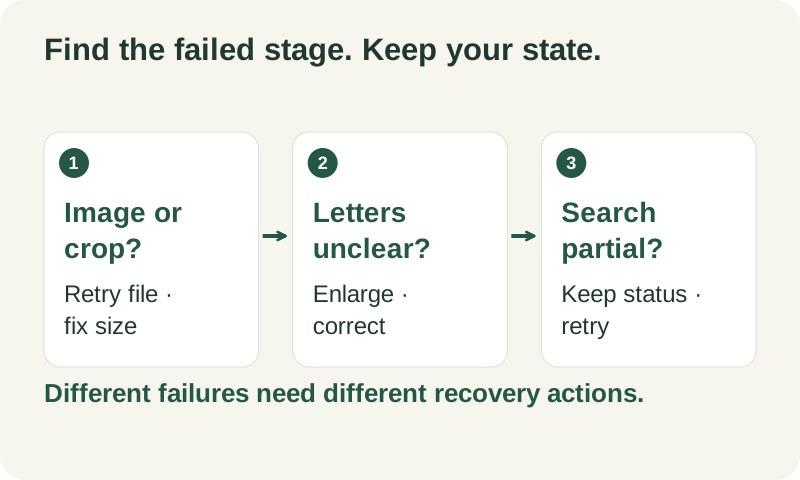
What to carry into your next attempt
Use Word Hunt Solver help to isolate a failed stage and preserve useful state. Confirmed letters, visible rule settings, completion labels, and local exports provide concrete recovery points. If a minimal example still fails, prepare a report with versions and steps while omitting private screenshots and history unless you deliberately choose to include them.
Check the selected rules and custom points, word-list source and license, verification methods, and local data and network details when interpreting this example.
Updated October 10, 2026 · Independent Word Hunt Solver project