Make the board yours
Custom board practice
Paste letters in row order, or enter space-separated tokens such as QU. For images, recognize your screenshot and review each letter, then select “Practice this board.” Images stay out of sessions and history. For tile-by-tile editing use Solver before handing the board to practice.
Set up your practice
Custom rules · 4×43+ letters8 directionsQ = Q
Each tile is used once per word. Site word list and scoring are independent of GamePigeon.
Word list & rule versions
Word list: enable1 v1. Rules: custom-4 1.0.0. Scoring: length-v1. GamePigeon word acceptance and scoring are not verified.
Pausing marks the session as paused. Its score stays separate from uninterrupted timed records.
Prepare a board before starting. No answers are shown during practice.
Practical details and worked examples
Custom word hunt practice preserves the exact letters you want to learn from. Paste rows or enter each tile, choose the matching dimensions, and confirm the rules before starting. A word hunt trainer is useful for retrying a difficult region, investigating a word family, or comparing two movement settings on a fixed board. Your input remains a local learning challenge; the page does not infer another game’s official dictionary or silently attach personal history to a share.
Preserve positions while entering letters
For custom word hunt practice, read left to right across a row, then move down. Four rows require sixteen tiles, while seven require forty-nine. Compact input works for single letters; space-separated tokens preserve QU or another two- or three-letter tile. Review the first and last token of every row after pasting. An omitted position can shift everything that follows, producing a plausible but different challenge. Correct that geometry before evaluating whether a route or accepted word is wrong.
Treat special letters as a rule choice
A literal Q tile and a QU tile are not interchangeable. You can choose automatic QU for a visible Q when that is the Custom meaning you want, or keep literal Q. The path still occupies one position, while the assembled word gains the appropriate letters. Decide the meaning before play and record it with the session. A comparison that changes Q handling is a rule experiment rather than a controlled test of the same round.
Build a controlled retry
Keep the board unchanged and select one objective: recognize short words more quickly, find a missed suffix, or follow a turning path accurately. First explore without a timer, then replay under a chosen deadline if speed is the goal. When testing a rule difference, change one setting at a time. Eight-direction versus orthogonal movement is a clear experiment because it alters diagonal legality without changing the entered letters or dictionary version.
Read word and path feedback separately
A submission must connect adjacent positions without reuse, assemble enough letters, and belong to the current ENABLE list. Repeating an already found word is reported as a duplicate even when another route exists. A familiar spelling can fail because the path jumps or the game you have in mind uses a different dictionary. The tool reports its own selected rules. Investigate the specific reason before drawing conclusions about your vocabulary. A duplicate spelling remains a duplicate across alternative routes.
Keep the result’s context in review
Custom word hunt practice review pairs found words with missed opportunities and selectable paths. If its search stopped at a budget, the missed set is incomplete. Preserve that status when interpreting the session. Local records also retain rule and dictionary versions, timing mode, and pause information. Compare matching conditions, and use a focused same-board replay to make one lesson concrete. Personal history is optional and remains a learning record rather than a public ranking.
A practical sequence
- Choose the correct size before generating or entering the challenge.
- Confirm adjacency, minimum length, Q behavior, and timer mode.
- Submit adjacent paths and read the reason for each rejection.
- Finish the round and inspect one useful missed route.
- Retry the exact board, then test the skill on a fresh challenge.
A worked example
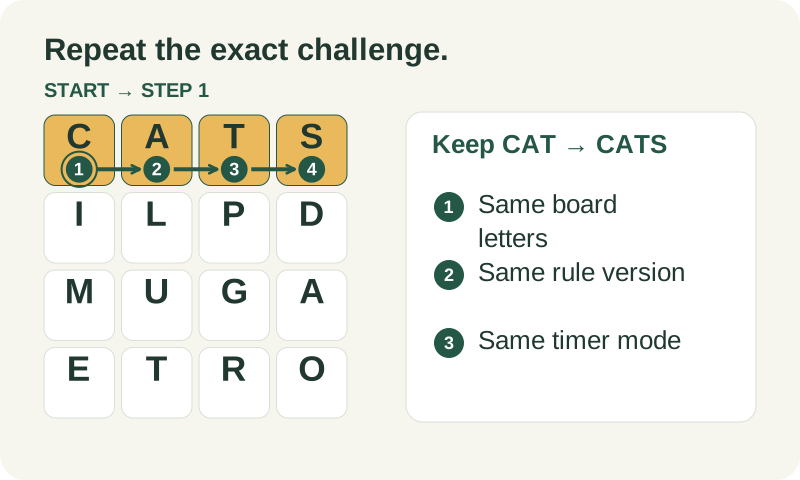
Enter C A T across three adjacent tiles and place a separate S beside T. A first round may find CAT while missing CATS. Review the four-step route, then retry the same board and settings. If you move S to a distant tile before the second attempt, the challenge has changed; familiarity with the spelling no longer establishes a legal extension. A word hunt trainer is most useful when it preserves the exact constraint you are trying to learn.
What to carry into your next attempt
Custom word hunt practice makes exact comparison possible, provided you preserve both letters and conditions. Save a local record only if you want it, preview any shared board and rules, and keep paused attempts distinct. Use review to identify one decision you can improve rather than changing the input until a desired word appears.
Check the selected rules and custom points, word-list source and license, verification methods, and local data and network details when interpreting this example.