Custom Word Hunt · 16 tiles
4×4 Word Hunt Solver
Start with a compact 16-tile board. Type each letter, paste four rows, or review a screenshot before finding a numbered path.
0 / 16 tiles · Type, paste, or move with arrow keys.
Paste a whole board
Custom rules · 4×43+ letters8 directionsQ = Q90s practice
Each tile is used once per word. Site word list and scoring are independent of GamePigeon.
Word list & rule versions
Word list: enable1 v1. Rules: custom-4 1.0.0. Scoring: length-v1. GamePigeon word acceptance and scoring are not verified.
Search options
A time limit keeps large searches responsive. Unfinished searches show partial results; raise the budget to search longer.
Letters and screenshots are processed on this device. Privacy & network details
Your word list
Ready when you areFilter & sort
A clear path to every word.
Enter your letters or review a screenshot, then find words from our published English word list. Select a word to see a numbered swipe path.
How to enter a 4×4 board
Choose exactly 16 tiles in row order. You can enter letters individually, paste 4 lines of 4 letters, or separate individual tokens with spaces. A spaced QU token uses one tile and contributes two letters to a word. Check the selected Q rule against your board.
A transparent alternative to game-specific answers
The 4×4 grid supports the familiar neighboring-tile Word Hunt task. This tool is independent of GamePigeon: its ENABLE word list, custom scoring and 90-second practice default are published site choices, not claims about the current game version.
Check a word before you swipe
Select a word to reveal its starting tile, direction arrows and step numbers. Coordinates give a second way to follow the route without relying on color. Try alternate legal paths or play the route step by step.
Practice and review the same 16 tiles
Practice this board copies your letters and selected rules into a local session. A finished practice reveals found and missed words. Save locally puts the board on this device; Share board opens an explicit preview and includes only board letters and versioned rules.
Compare board sizes · Understand dictionary limits · Use a screenshot instead
Practical details and worked examples
The word hunt solver 4x4 page is for a square board with sixteen tiles. Match the real dimensions first, then use the visible tool to enter, review, and search the letters. Size affects available positions and reading comfort; it does not authorize tile reuse or a jump across the grid. This page explains how to keep the larger workflow precise while retaining a traceable answer for every word.
Confirm the complete grid
In Word Hunt Solver 4x4, every misplaced letter is proportionally important. Check four rows of four tiles rather than one uninterrupted sixteen-letter string. Corners have fewer exits than center cells, which makes them a convenient starting point when you are learning adjacency. The smaller grid is also useful for comparing eight-direction and orthogonal paths without losing the position of each letter.
Explore with a repeatable method
Start with three-letter neighbors before chasing long words. The board in Word Hunt Solver 4x4 can contain a surprisingly dense network of short prefixes, especially when common vowels meet repeated consonants. Mark a mental starting tile, examine its neighbors, and move to the next start after a deliberate check. Finding a word does not exhaust a starting position; another branch may use the same first letter and diverge on its second or third step.
Keep tile semantics explicit
Use the compact grid to compare two movement settings carefully. A corner C can connect to an A on its right in either adjacency mode. From that A, a diagonally placed T is permitted in eight-direction mode but not in orthogonal mode. Keep all sixteen letters fixed and change only adjacency to see the difference. An explicit QU tile supplies two letters in one position; a literal Q supplies one unless automatic QU is selected. The short routes make both distinctions easy to inspect.
Understand search limits before exporting
A four-row sample commonly finishes quickly, but size alone is not a guarantee of completion. Read the actual search status before treating an absent spelling as impossible. You can cancel any running search, and a canceled list remains unfinished even when it contains several familiar answers. If Word Hunt Solver 4x4 completes with no results, recheck the sixteen letters and selected minimum length. For an empty canceled result, the unanswered question is whether additional traversal would have found words.
Compare like with like
Use a small same-board experiment to learn what your settings mean. First search with eight-direction movement, select a diagonal route, and note its positions. Then switch to orthogonal movement and solve again without editing any letters. A vanished route reflects the changed rule, not a dictionary update or lost vocabulary. For a practice retry, keep the original settings and compare pause and timer conditions. The custom points count letters beyond two; they do not represent a verified external score.
A practical sequence
- Choose 4 × 4 and confirm sixteen visible cells.
- Paste 4 rows, or space-separate multi-letter tile tokens.
- Inspect both edges of each row before searching.
- Choose a word and follow its numbered start and directions.
- Check completion status, then practice or export with the selected rules.
A worked example
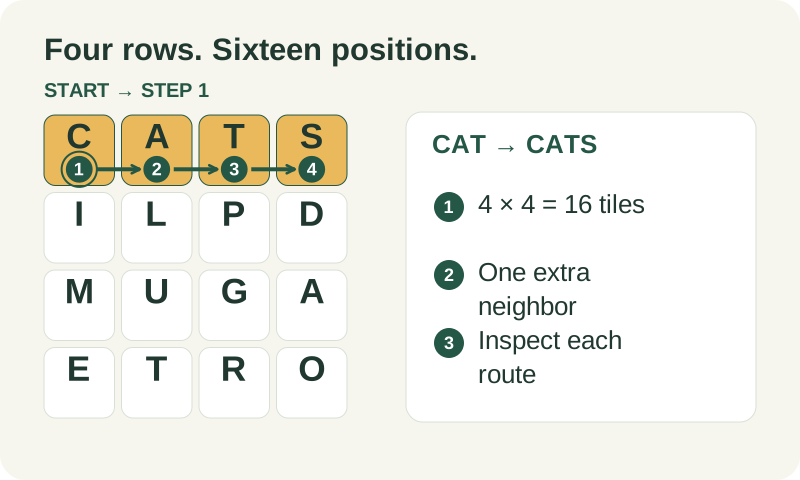
On the example board, the top row begins C A T S. CAT and CATS are straightforward extensions under the default rules, using three and four distinct positions. Do not assume every word elsewhere in the result list uses that same row. Select the actual result to inspect its retained path, then try the alternative path control when the same spelling can be assembled elsewhere.
What to carry into your next attempt
A 4x4 word hunt solver helps only when the entered geometry matches the puzzle. If letters look wrong, return to input or image review before testing game acceptance. Keep larger boards labeled Custom and consult the rule and dictionary explanations when interpreting a result. Size support is a technical capability; it is not evidence of official compatibility with a particular game version.
Check the selected rules and custom points, word-list source and license, verification methods, and local data and network details when interpreting this example.