Custom Word Hunt · 25 tiles
5×5 Word Hunt Solver
More room for word families. Enter 25 tiles, explore longer routes, and practice the same board with your chosen custom rules.
0 / 25 tiles · Type, paste, or move with arrow keys.
Paste a whole board
Custom rules · 5×53+ letters8 directionsQ = Q90s practice
Each tile is used once per word. Site word list and scoring are independent of GamePigeon.
Word list & rule versions
Word list: enable1 v1. Rules: custom-5 1.0.0. Scoring: length-v1. GamePigeon word acceptance and scoring are not verified.
Search options
A time limit keeps large searches responsive. Unfinished searches show partial results; raise the budget to search longer.
Letters and screenshots are processed on this device. Privacy & network details
Your word list
Ready when you areFilter & sort
A clear path to every word.
Enter your letters or review a screenshot, then find words from our published English word list. Select a word to see a numbered swipe path.
How to enter a 5×5 board
Choose exactly 25 tiles in row order. You can enter letters individually, paste 5 lines of 5 letters, or separate individual tokens with spaces. A spaced QU token uses one tile and contributes two letters to a word. Check the selected Q rule against your board.
Custom support, with explicit rules
This 5×5 tool is a Custom Word Hunt solver. Supporting 25 tiles does not mean GamePigeon officially offers this mode. Its default rules allow eight directions, turns and no tile reuse; change them before solving or practicing.
Check a word before you swipe
Select a word to reveal its starting tile, direction arrows and step numbers. Coordinates give a second way to follow the route without relying on color. Try alternate legal paths or play the route step by step.
Practice and review the same 25 tiles
Practice this board copies your letters and selected rules into a local session. A finished practice reveals found and missed words. Save locally puts the board on this device; Share board opens an explicit preview and includes only board letters and versioned rules.
Compare board sizes · Understand dictionary limits · Use a screenshot instead
Practical details and worked examples
The word hunt solver 5x5 page is for a square board with twenty-five tiles. Match the real dimensions first, then use the visible tool to enter, review, and search the letters. Size affects available positions and reading comfort; it does not authorize tile reuse or a jump across the grid. This page explains how to keep the larger workflow precise while retaining a traceable answer for every word.
Confirm the complete grid
In Word Hunt Solver 5x5, count five rows and five columns before choosing this tool. Compared with a four-row board, the extra ring introduces additional starting positions and more branches through the interior. Pasting a familiar smaller puzzle into this size leaves missing cells rather than a meaningful larger challenge. The site treats the five-row format as Custom support; it does not assert that the format is an official mode of another game.
Explore with a repeatable method
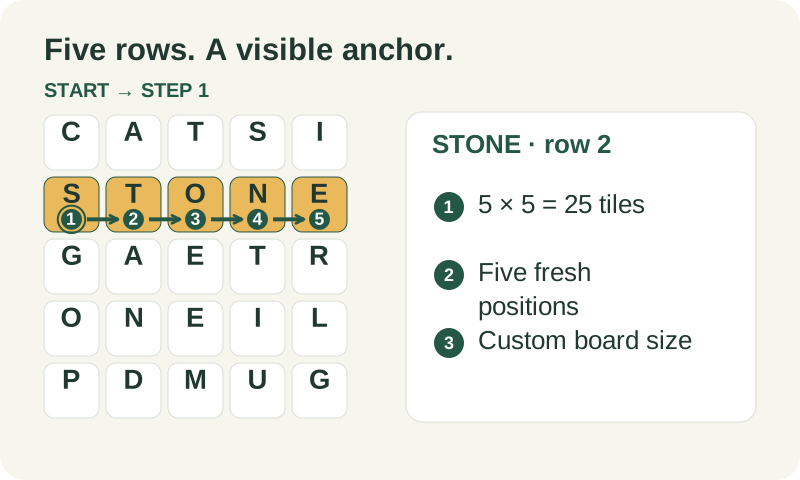
Use a visible anchor to keep your place, then leave the straight line. Generated practice boards of this size place STONE across the second row as an intentional playable seed. That anchor can help you verify row order, but it is not an answer key for every board entered into the tool. Explore neighbors above and below the anchor, looking for fresh starts and word-family extensions that have their own legal routes.
Keep tile semantics explicit
An extra ring can create another route to an already found spelling. In Word Hunt Solver 5x5, select a word and compare the retained alternatives, and notice which positions differ. If a later extension needs a letter consumed by the first route, try rebuilding from an alternative rather than reusing the occupied tile. The alternatives are bounded, so the displayed set is not an exhaustive path count. QU remains one visited position even though it contributes two letters to the assembled spelling.
Understand search limits before exporting
When a five-row search is unfinished, keep its partial list useful without calling it exhaustive. A cancellation or budget stop can occur before every starting position is processed. Copying the words does not change that status. If you entered STONE as a visible second-row anchor, check the surrounding letters before assuming all its extensions should appear. A complete search answers membership and geometry for this input; it cannot establish whether a different game accepts the same spelling.
Compare like with like
Use Word Hunt Solver 5x5 to compare a controlled retry with its own earlier attempt. Preserve all twenty-five positions, literal Q or automatic QU, minimum length, and dictionary version. A session with extra diagonal choices has a different opportunity set from an orthogonal session. A paused attempt also differs from an uninterrupted timed one. Review a missed branch around the second-row anchor and replay that decision before moving to a fresh board. Improvement on a memorized route is useful learning, but it is not a population ranking.
A practical sequence
- Choose 5 × 5 and confirm twenty-five visible cells.
- Paste 5 rows, or space-separate multi-letter tile tokens.
- Inspect both edges of each row before searching.
- Choose a word and follow its numbered start and directions.
- Check completion status, then practice or export with the selected rules.
A worked example
Take STONE across row 2 of a generated sample. It uses five positions in order. If there is an adjacent S at the end, STONES is only a candidate until the path and dictionary checks succeed. The extra letter cannot come from a distant cell just because the spelling is familiar. Choose the exact result to inspect whether its sixth step is adjacent and whether it revisits any earlier position.
What to carry into your next attempt
A 5x5 word hunt solver helps only when the entered geometry matches the puzzle. If letters look wrong, return to input or image review before testing game acceptance. Keep larger boards labeled Custom and consult the rule and dictionary explanations when interpreting a result. Size support is a technical capability; it is not evidence of official compatibility with a particular game version.
Check the selected rules and custom points, word-list source and license, verification methods, and local data and network details when interpreting this example.