Custom Word Hunt · 36 tiles
6×6 Word Hunt Solver
Work through all 36 tiles with an adjustable search budget. Enlarge the board, check every letter, and keep long swipe paths readable.
0 / 36 tiles · Type, paste, or move with arrow keys.
Paste a whole board
Custom rules · 6×63+ letters8 directionsQ = Q90s practice
Each tile is used once per word. Site word list and scoring are independent of GamePigeon.
Word list & rule versions
Word list: enable1 v1. Rules: custom-6 1.0.0. Scoring: length-v1. GamePigeon word acceptance and scoring are not verified.
Search options
A time limit keeps large searches responsive. Unfinished searches show partial results; raise the budget to search longer.
Letters and screenshots are processed on this device. Privacy & network details
Your word list
Ready when you areFilter & sort
A clear path to every word.
Enter your letters or review a screenshot, then find words from our published English word list. Select a word to see a numbered swipe path.
How to enter a 6×6 board
Choose exactly 36 tiles in row order. You can enter letters individually, paste 6 lines of 6 letters, or separate individual tokens with spaces. A spaced QU token uses one tile and contributes two letters to a word. Check the selected Q rule against your board.
Custom support, with explicit rules
This 6×6 tool is a Custom Word Hunt solver. Supporting 36 tiles does not mean GamePigeon officially offers this mode. Its default rules allow eight directions, turns and no tile reuse; change them before solving or practicing.
Read large-board paths and partial searches
Use Enlarge board for bigger tiles; the board scrolls within its own container on narrow screens. Selecting a word keeps its label and compact numbered route together on mobile. The search has a visible time budget. If it stops early, the tool labels the word list as partial; raise the budget and solve again when you need a more complete search.
Practice and review the same 36 tiles
Practice this board copies your letters and selected rules into a local session. A finished practice reveals found and missed words. Save locally puts the board on this device; Share board opens an explicit preview and includes only board letters and versioned rules.
Compare board sizes · Understand dictionary limits · Use a screenshot instead
Practical details and worked examples
The word hunt solver 6x6 page is for a square board with thirty-six tiles. Match the real dimensions first, then use the visible tool to enter, review, and search the letters. Size affects available positions and reading comfort; it does not authorize tile reuse or a jump across the grid. This page explains how to keep the larger workflow precise while retaining a traceable answer for every word.
Confirm the complete grid
In the word hunt solver 6x6 interface, verify six groups of six tokens, with row boundaries kept visible while you paste or compare an image. A single omitted tile shifts every later position in compact input and changes the spatial puzzle. Larger letter area also increases the chance of accidentally reading a neighboring tile. Work row by row when correcting input, and use the source-cell enlargement in the image workflow instead of guessing from a tiny overview.
Explore with a repeatable method
Divide manual exploration into regions without imposing a false movement rule. You might inspect starting positions in the upper two rows, then the middle two, then the lower two. A legal path can cross those imaginary boundaries whenever adjacent cells allow it. The division is a scanning aid, not a restriction. Center positions often offer more branches; revisit them with a specific prefix goal rather than repeatedly searching without a plan.
Keep tile semantics explicit
Thirty-six positions exceed the safe range of one JavaScript 32-bit visitation mask. Word Hunt Solver 6x6 marks each position independently in an array, including indices 31 and 32: row 6 column 2 and row 6 column 3. Those neighboring cells must never be confused during traversal. At the interface level, use numbered steps to inspect both when a route crosses them. Multi-letter tokens still occupy one position, and repeated visible letters are allowed only when their physical indices differ.
Understand search limits before exporting
The word hunt solver 6x6 format makes the difference between a retained partial answer and a completed search especially important. Check whether traversal finished or stopped at its visible time or node budget. Raise an available search budget and recompute when appropriate, or cancel to keep editing responsive. An unlisted spelling in partial results may simply be undiscovered. If a complete search misses a familiar word, inspect its proposed geometry and the versioned dictionary instead of assuming a budget stop happened.
Compare like with like
When using Word Hunt Solver 6x6, keep scanning sectors separate from comparison conditions. Rows 1–2, 3–4, and 5–6 organize where you begin; legal paths can cross those boundaries. A useful retry repeats the same thirty-six positions and rule profile, then changes one scanning habit. Record whether timing was active or paused. Custom length points describe accepted letters, not a verified score in another game. Review missed starts in one sector before interpreting a higher total on an unrelated board as evidence of broad improvement.
A practical sequence
- Choose 6 × 6 and confirm thirty-six visible cells.
- Paste 6 rows, or space-separate multi-letter tile tokens.
- Inspect both edges of each row before searching.
- Choose a word and follow its numbered start and directions.
- Check completion status, then practice or export with the selected rules.
A worked example
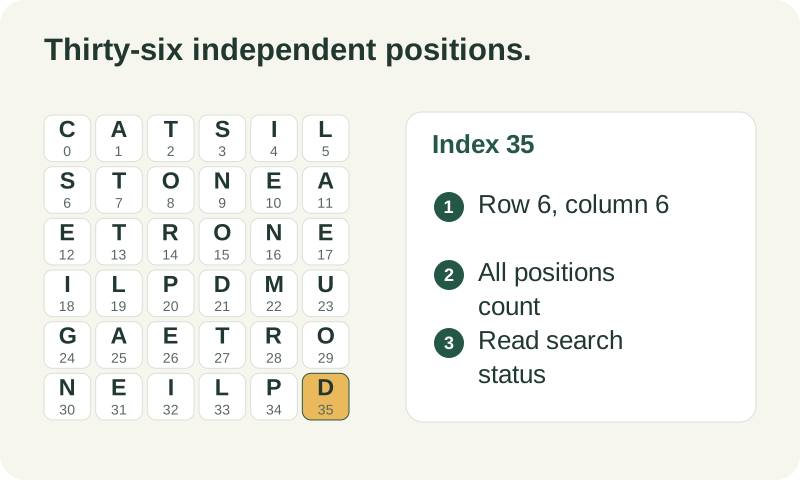
A path can visit a tile with row-major index 35 on this grid. That position is row 6 column 6, not the fourth cell of a smaller board. This is why the search uses an array of visited markers instead of one 32-bit shift mask. In ordinary use, you should see the correct full grid highlighted. Index correctness is an engine property, not a promise that every board will finish within the budget.
What to carry into your next attempt
A 6x6 word hunt solver helps only when the entered geometry matches the puzzle. If letters look wrong, return to input or image review before testing game acceptance. Keep larger boards labeled Custom and consult the rule and dictionary explanations when interpreting a result. Size support is a technical capability; it is not evidence of official compatibility with a particular game version.
Check the selected rules and custom points, word-list source and license, verification methods, and local data and network details when interpreting this example.