Custom Word Hunt · 49 tiles
7×7 Word Hunt Solver
A 49-tile board needs a clear route. Zoom the grid, filter your word list, and follow numbered paths one step at a time.
0 / 49 tiles · Type, paste, or move with arrow keys.
Paste a whole board
Custom rules · 7×73+ letters8 directionsQ = Q90s practice
Each tile is used once per word. Site word list and scoring are independent of GamePigeon.
Word list & rule versions
Word list: enable1 v1. Rules: custom-7 1.0.0. Scoring: length-v1. GamePigeon word acceptance and scoring are not verified.
Search options
A time limit keeps large searches responsive. Unfinished searches show partial results; raise the budget to search longer.
Letters and screenshots are processed on this device. Privacy & network details
Your word list
Ready when you areFilter & sort
A clear path to every word.
Enter your letters or review a screenshot, then find words from our published English word list. Select a word to see a numbered swipe path.
How to enter a 7×7 board
Choose exactly 49 tiles in row order. You can enter letters individually, paste 7 lines of 7 letters, or separate individual tokens with spaces. A spaced QU token uses one tile and contributes two letters to a word. Check the selected Q rule against your board.
Custom support, with explicit rules
This 7×7 tool is a Custom Word Hunt solver. Supporting 49 tiles does not mean GamePigeon officially offers this mode. Its default rules allow eight directions, turns and no tile reuse; change them before solving or practicing.
Read large-board paths and partial searches
Use Enlarge board for bigger tiles; the board scrolls within its own container on narrow screens. Selecting a word keeps its label and compact numbered route together on mobile. The search has a visible time budget. If it stops early, the tool labels the word list as partial; raise the budget and solve again when you need a more complete search.
Practice and review the same 49 tiles
Practice this board copies your letters and selected rules into a local session. A finished practice reveals found and missed words. Save locally puts the board on this device; Share board opens an explicit preview and includes only board letters and versioned rules.
Compare board sizes · Understand dictionary limits · Use a screenshot instead
Practical details and worked examples
The word hunt solver 7x7 page is for a square board with forty-nine tiles. Match the real dimensions first, then use the visible tool to enter, review, and search the letters. Size affects available positions and reading comfort; it does not authorize tile reuse or a jump across the grid. This page explains how to keep the larger workflow precise while retaining a traceable answer for every word.
Confirm the complete grid
Count seven rows and columns and keep all forty-nine positions editable. Use the 7x7 word hunt solver zoom when the letters or numbered steps become small, especially on a narrow screen. The selected word and its route should remain understandable while you inspect the board. Enlarging the display changes the view only; it does not change tiles, adjacency, or which paths are legal. Recheck row boundaries when moving between an image and compact pasted input.
Explore with a repeatable method
Choose a narrow goal for deliberate practice on a wide board. One row of starting positions, one family of endings, or one long prefix is more manageable than trying to exhaust every branch at once. A 7x7 word hunt solver reveals opportunity, but it does not make a particular word easier to notice. Separate your ability to scan positions from the engine’s ability to traverse all dictionary prefixes, and compare sessions on the same Custom settings.
Keep tile semantics explicit
At an enlarged scale, the seven-row board can scroll inside its own container on a narrow display. Keep the selected word label and compact numbered route as your reference while inspecting a distant edge. Directions and step numbers matter more than a colored region when the path is long. A QU token changes assembled letter count without adding another position. Zoom in the 7x7 word hunt solver never changes adjacency, and a letter outside the current viewport must still touch the previous physical tile.
Understand search limits before exporting
Distinguish complete, canceled, and budget-limited results before using a seven-row list as a reference set. A partial search can contain many words and still miss valid ones. The 7x7 word hunt solver keeps an explicit unfinished status so that quantity does not masquerade as completeness. Use cancellation when you need to change the board, then solve its new revision. If no words were found before cancellation, that empty result is an unresolved search rather than proof that the forty-nine tiles have no accepted routes.
Compare like with like
Choose a comparison narrow enough for this wide grid. Keep the forty-nine letters fixed, select one row of starts or a family pattern, and repeat under the same timer and rules. Pauses alter the conditions and remain identifiable in history. An enlarged view can improve readability without increasing dictionary opportunities. A changed adjacency rule does increase or reduce those opportunities, so call that a separate experiment. Review one distant-edge route carefully before treating the total as a measure of general speed.
A practical sequence
- Choose 7 × 7 and confirm forty-nine visible cells.
- Paste 7 rows, or space-separate multi-letter tile tokens.
- Inspect both edges of each row before searching.
- Choose a word and follow its numbered start and directions.
- Check completion status, then practice or export with the selected rules.
A worked example
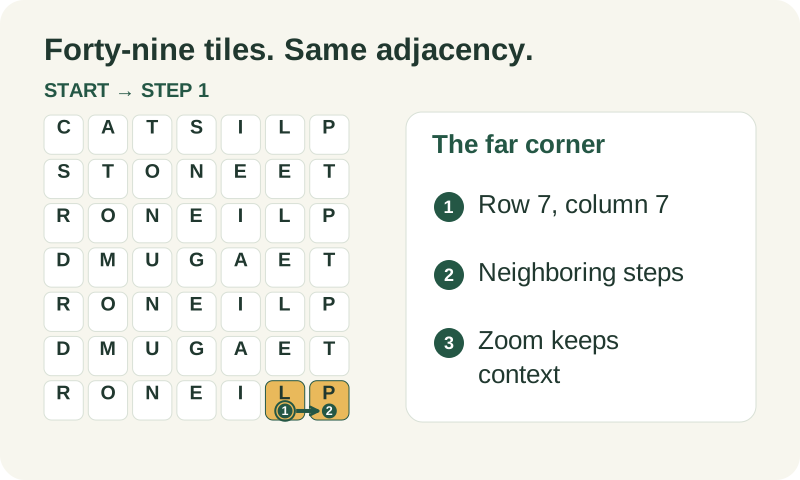
On a seven-row board, row-major index 48 names row 7 column 7. A route from row 7 column 6 into that corner is adjacent, while jumping from the opposite edge is not. If a result uses the bottom row, verify its numbered steps at the enlarged scale. A long word that needs the far corner still has to connect continuously; distance on the display never substitutes for adjacency.
What to carry into your next attempt
A 7x7 word hunt solver helps only when the entered geometry matches the puzzle. If letters look wrong, return to input or image review before testing game acceptance. Keep larger boards labeled Custom and consult the rule and dictionary explanations when interpreting a result. Size support is a technical capability; it is not evidence of official compatibility with a particular game version.
Check the selected rules and custom points, word-list source and license, verification methods, and local data and network details when interpreting this example.